
I like the new layout of the cladogram, with the testees' names located directly under their terminal SNPs.
I find it definitely easier to navigate.
Cladogram Layout
-
Geoff Melloy

- Maccfuirmid Senchada
- Posts: 23
- Joined: Wed, 2020-Mar-18 10:53 am
- Location: Brisbane Australia
-
Webmaster

- Site Admin
- Posts: 1586
- Joined: Wed, 2019-Jun-26 2:47 pm
Re: Cladogram Layout
Thanks, Geoff!
BTW, despite my intense dislike of the term "subject", which sounds so cold and clinical, I wound up using it because the use of "testee" seemed worse given the very bad pun of "testees" and "testes".
BTW, despite my intense dislike of the term "subject", which sounds so cold and clinical, I wound up using it because the use of "testee" seemed worse given the very bad pun of "testees" and "testes".

-
BuckeyeMike
- Dos Senchada
- Posts: 55
- Joined: Sat, 2021-Feb-06 4:56 pm
Re: Cladogram Layout
David,
Apologies, but I'm not seeing the new layout on Foxfire, Google, or Edge. What am I missing?
Mike
Apologies, but I'm not seeing the new layout on Foxfire, Google, or Edge. What am I missing?
Mike
Micheál Ó Rothláin
-
Geoff Melloy
- Maccfuirmid Senchada
- Posts: 23
- Joined: Wed, 2020-Mar-18 10:53 am
- Location: Brisbane Australia
Re: Cladogram Layout
Mike,
I'm not seeing the new layout now either. Maybe I spoke too soon ...??
David
I share your feelings re the term Testee. I often use Tester instead. Maybe "Tested Person" would be better - bit of a mouthful though - though no more so than some other current circumlocutions that have become popular of late!
I'm not seeing the new layout now either. Maybe I spoke too soon ...??
David
I share your feelings re the term Testee. I often use Tester instead. Maybe "Tested Person" would be better - bit of a mouthful though - though no more so than some other current circumlocutions that have become popular of late!
-
Webmaster
- Site Admin
- Posts: 1586
- Joined: Wed, 2019-Jun-26 2:47 pm
Re: Cladogram Layout
Gentlemen,
Pardon my confusion, but I am not sure what you are referring to. Since the beginning the Cladogram has always shown something similar to:
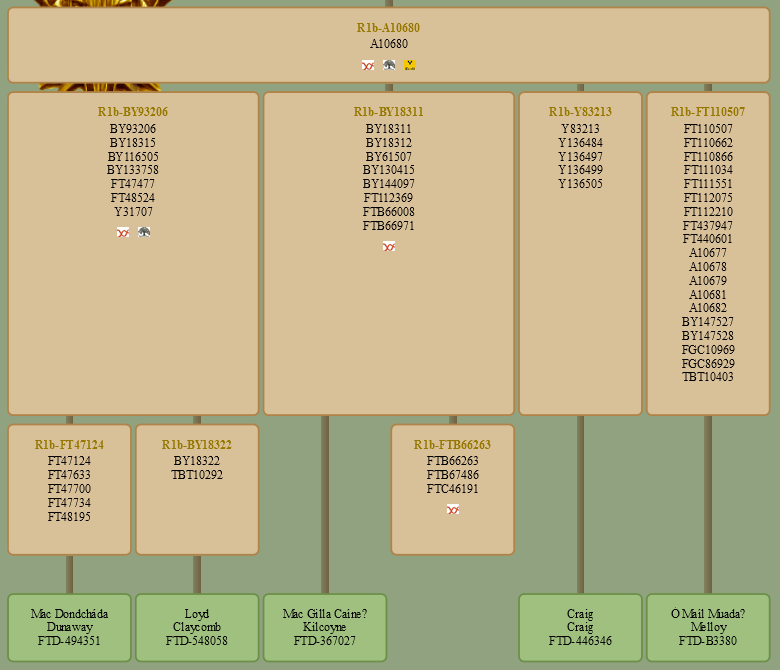
https://genelach.com/R1b-A10680/
In the case of R1b-FTB66263, there are no known members with publicly available information.
Pardon my confusion, but I am not sure what you are referring to. Since the beginning the Cladogram has always shown something similar to:
https://genelach.com/R1b-A10680/
In the case of R1b-FTB66263, there are no known members with publicly available information.
-
Geoff Melloy
- Maccfuirmid Senchada
- Posts: 23
- Joined: Wed, 2020-Mar-18 10:53 am
- Location: Brisbane Australia
Re: Cladogram Layout
Hmmm . I must be using the cladogram in the wrong way. I tried to get a screen shot but it didn't work, so I'll try to describe what I see.
When I select the Cladogram option from the menu, I get the whole bloomin lot. I then search for say BY11548, and have to scroll down through a couple of screenfuls of (vertical) connecting lines to find the individual tested members. Conversely, if I search for my box (B3380), I have to follow up a few pages of connection lines to find my SNP. If I reduce the size to shorten the lines, the text becomes too small to read.
A couple of days ago I got something like the screen shot you gave, but next day it was back to the usual stretched-out format. What should I be doing to bring up a screen of BY11548 only??
Geoff
When I select the Cladogram option from the menu, I get the whole bloomin lot. I then search for say BY11548, and have to scroll down through a couple of screenfuls of (vertical) connecting lines to find the individual tested members. Conversely, if I search for my box (B3380), I have to follow up a few pages of connection lines to find my SNP. If I reduce the size to shorten the lines, the text becomes too small to read.
A couple of days ago I got something like the screen shot you gave, but next day it was back to the usual stretched-out format. What should I be doing to bring up a screen of BY11548 only??
Geoff
-
Webmaster
- Site Admin
- Posts: 1586
- Joined: Wed, 2019-Jun-26 2:47 pm
Re: Cladogram Layout
Geoff,
Try https://genelach.com/R1b-BY11548/. Clicking on any gold clade name will take you to that clade. If you close the menu bar at the top, underneath is a "clade trail" that shows the path from R1b-DF104 down to the current clade. Again, clicking on any gold clade name will take you to that clade. I hope that helps.
There is no way to use a kit number to go to a clade, however. I MIGHT think about adding that functionality; something like https://genelach.com/FTD-B3380/ would take you to https://genelach.com/R1b-A10680/, the clade above your unique phylogenetic node. But this won't happen any time soon.
Try https://genelach.com/R1b-BY11548/. Clicking on any gold clade name will take you to that clade. If you close the menu bar at the top, underneath is a "clade trail" that shows the path from R1b-DF104 down to the current clade. Again, clicking on any gold clade name will take you to that clade. I hope that helps.
There is no way to use a kit number to go to a clade, however. I MIGHT think about adding that functionality; something like https://genelach.com/FTD-B3380/ would take you to https://genelach.com/R1b-A10680/, the clade above your unique phylogenetic node. But this won't happen any time soon.
-
Webmaster
- Site Admin
- Posts: 1586
- Joined: Wed, 2019-Jun-26 2:47 pm
Re: Cladogram Layout
*** UPDATE ***
Well, it was easier than I thought, so now you can use kit numbers to go to a clade. The kit number MUST use the form FTD-<kit number>, FGC-<kit number>, etc. So now https://genelach.com/FTD-B3380/ will indeed take you to https://genelach.com/R1b-A10680/. Not bad for only 30 minutes worth of code editing. Thanks for the idea, Geoff!
Well, it was easier than I thought, so now you can use kit numbers to go to a clade. The kit number MUST use the form FTD-<kit number>, FGC-<kit number>, etc. So now https://genelach.com/FTD-B3380/ will indeed take you to https://genelach.com/R1b-A10680/. Not bad for only 30 minutes worth of code editing. Thanks for the idea, Geoff!
-
Geoff Melloy
- Maccfuirmid Senchada
- Posts: 23
- Joined: Wed, 2020-Mar-18 10:53 am
- Location: Brisbane Australia
Re: Cladogram Layout
Thanks David, I think I can get my head around it now!
-
Fred Claussen
- Fochloc Senchada
- Posts: 11
- Joined: Mon, 2021-Oct-11 5:23 pm
Re: Cladogram Layout
Hi David:
Just saw your posting re your "30 minutes of coding" whereby you added the functionality to locate the appropriate branches of the Cladogram via the FTD kit no. -- worked great for my three Dodson kits!
Thanks for your help with this. Very, very useful!
Fred Claussen
Saratoga, California
USA
Just saw your posting re your "30 minutes of coding" whereby you added the functionality to locate the appropriate branches of the Cladogram via the FTD kit no. -- worked great for my three Dodson kits!
Thanks for your help with this. Very, very useful!
Fred Claussen
Saratoga, California
USA