Page 1 of 2
Cladogram Layout
Posted: Tue, 2022-Oct-11 4:30 am
by Geoff Melloy
I like the new layout of the cladogram, with the testees' names located directly under their terminal SNPs.
I find it definitely easier to navigate.
Re: Cladogram Layout
Posted: Tue, 2022-Oct-11 12:24 pm
by Webmaster
Thanks, Geoff!
BTW, despite my intense dislike of the term "subject", which sounds so cold and clinical, I wound up using it because the use of "testee" seemed worse given the very bad pun of "testees" and "testes".

Re: Cladogram Layout
Posted: Tue, 2022-Oct-11 4:09 pm
by BuckeyeMike
David,
Apologies, but I'm not seeing the new layout on Foxfire, Google, or Edge. What am I missing?
Mike
Re: Cladogram Layout
Posted: Thu, 2022-Oct-13 1:58 pm
by Geoff Melloy
Mike,
I'm not seeing the new layout now either. Maybe I spoke too soon ...??
David
I share your feelings re the term Testee. I often use Tester instead. Maybe "Tested Person" would be better - bit of a mouthful though - though no more so than some other current circumlocutions that have become popular of late!
Re: Cladogram Layout
Posted: Thu, 2022-Oct-13 2:11 pm
by Webmaster
Gentlemen,
Pardon my confusion, but I am not sure what you are referring to. Since the beginning the Cladogram has always shown something similar to:
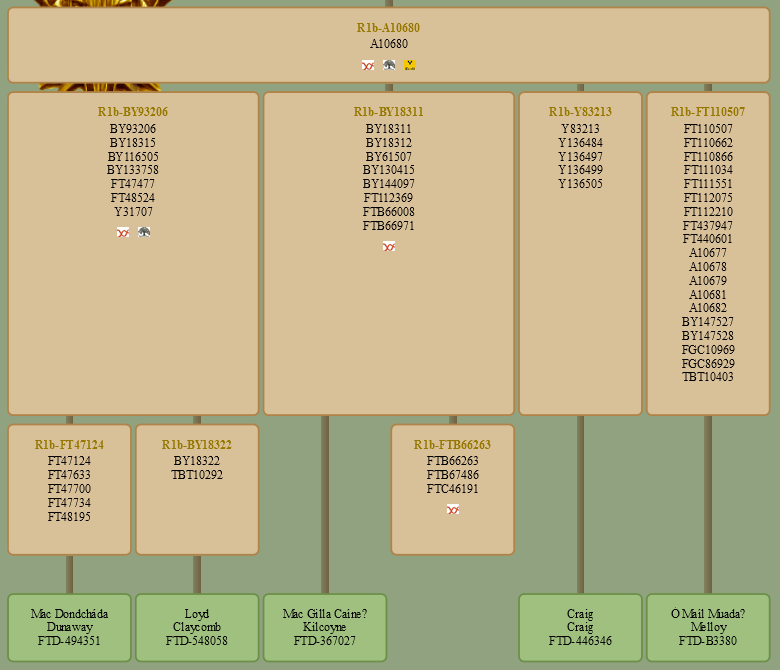 https://genelach.com/R1b-A10680/
In the case of R1b-FTB66263, there are no known members with publicly available information.
Re: Cladogram Layout
Posted: Fri, 2022-Oct-14 4:55 am
by Geoff Melloy
Hmmm . I must be using the cladogram in the wrong way. I tried to get a screen shot but it didn't work, so I'll try to describe what I see.
When I select the Cladogram option from the menu, I get the whole bloomin lot. I then search for say BY11548, and have to scroll down through a couple of screenfuls of (vertical) connecting lines to find the individual tested members. Conversely, if I search for my box (B3380), I have to follow up a few pages of connection lines to find my SNP. If I reduce the size to shorten the lines, the text becomes too small to read.
A couple of days ago I got something like the screen shot you gave, but next day it was back to the usual stretched-out format. What should I be doing to bring up a screen of BY11548 only??
Geoff
Re: Cladogram Layout
Posted: Fri, 2022-Oct-14 10:05 am
by Webmaster
Geoff,
Try
https://genelach.com/R1b-BY11548/. Clicking on any gold clade name will take you to that clade. If you close the menu bar at the top, underneath is a "clade trail" that shows the path from R1b-DF104 down to the current clade. Again, clicking on any gold clade name will take you to that clade. I hope that helps.
There is no way to use a kit number to go to a clade, however. I MIGHT think about adding that functionality; something like
https://genelach.com/FTD-B3380/ would take you to
https://genelach.com/R1b-A10680/, the clade above your unique phylogenetic node. But this won't happen any time soon.
Re: Cladogram Layout
Posted: Fri, 2022-Oct-14 12:04 pm
by Webmaster
*** UPDATE ***
Well, it was easier than I thought, so now you can use kit numbers to go to a clade. The kit number MUST use the form FTD-<kit number>, FGC-<kit number>, etc. So now
https://genelach.com/FTD-B3380/ will indeed take you to
https://genelach.com/R1b-A10680/. Not bad for only 30 minutes worth of code editing. Thanks for the idea, Geoff!
Re: Cladogram Layout
Posted: Sat, 2022-Oct-15 12:43 pm
by Geoff Melloy
Thanks David, I think I can get my head around it now!
Re: Cladogram Layout
Posted: Sat, 2022-Dec-24 3:29 am
by Fred Claussen
Hi David:
Just saw your posting re your "30 minutes of coding" whereby you added the functionality to locate the appropriate branches of the Cladogram via the FTD kit no. -- worked great for my three Dodson kits!
Thanks for your help with this. Very, very useful!
Fred Claussen
Saratoga, California
USA